
You open tab after tab, convinced that more results mean faster answers. Twenty minutes later, you’re buried in browser windows, still hunting for that one article you read last week. Sound familiar? Most knowledge workers default to the same search habits they’ve had for years, not realizing that the method they choose matters as much as the query itself. AI search and keyword search are fundamentally different tools, each with real strengths and real blind spots. Understanding both can cut your research time dramatically and finally get your tab count under control.
Table of Contents
- How keyword search works
- How AI search (semantic search) works
- AI search vs keyword search: Direct comparison
- Real-world productivity: How search type affects your workflow
- When keyword search wins, when AI wins, and when you need both
- Optimizing your search and information strategy for the future
- Supercharge your workflow with advanced search solutions
- Frequently asked questions
Key Takeaways
| Point | Details |
|---|---|
| AI and keyword search differ | AI understands context for complex queries, while keyword search excels with exact matches. |
| Hybrid search offers best results | Combining both methods balances precision and speed for daily productivity tasks. |
| Choose search based on task | Use exact keyword search for compliance and AI search for synthesis or ambiguous queries. |
| Reduce tab overload | AI search streamlines research by providing direct answers, minimizing the need for many open tabs. |
How keyword search works
Let’s start with the method most people know: keyword-based search.
Keyword search is built on exact term matching. When you type a query, the system scans an index of documents looking for pages that contain those specific words. Under the hood, keyword search uses algorithms like BM25 or TF-IDF, which rank results based on how often a term appears in a document and how rare that term is across the entire index. This structure is called an inverted index, essentially a giant lookup table that maps words to the documents containing them.
The payoff is speed. Keyword retrieval can return results in under 10 milliseconds, making it nearly instant for well-formed queries. That’s why it’s still the backbone of most enterprise search systems and databases.
Keyword search excels in these scenarios:
- Looking up a precise regulation code or compliance term
- Finding a document by its exact file name or title
- Searching for a specific product SKU or technical identifier
- Retrieving a known phrase from a legal or financial document
But it stumbles badly the moment your query drifts from exact wording. Search for “staff reduction” when the document says “workforce restructuring” and you get nothing. Misspell a term, use a synonym, or ask a natural language question and keyword search either returns irrelevant results or goes blank. For knowledge workers who rarely remember the exact phrasing of something they read, this is a daily frustration.
How AI search (semantic search) works
While keyword search is all about exact matches, AI search takes a very different path.
Instead of matching words, AI search matches meaning. It uses natural language processing and large language models to interpret what you actually want, not just what you typed. AI search uses vector embeddings from models like BERT to convert both your query and every indexed document into numerical representations. It then finds documents whose vectors are closest to your query vector using a method called cosine similarity. In plain terms: it finds content that means the same thing, even if the words are completely different.
This is why you can search for “that article about SaaS pricing strategies” and actually find it, even if the title says “How to price your B2B product.”
Many modern AI search tools also use retrieval-augmented generation, or RAG. RAG retrieves relevant passages and feeds them to a language model, which then synthesizes a direct answer with citations rather than just returning a list of links. It also supports follow-up questions, so you can refine your search conversationally.
AI search is the right tool when you need to:
- Answer a complex question that spans multiple sources
- Find information when you only remember the general topic, not the exact words
- Synthesize insights from several documents at once
- Handle ambiguous or conversational queries like “what was that pricing model we discussed?”
Pro Tip: Instead of opening five tabs to piece together an answer, phrase your query as a question in an AI search tool. Let it synthesize the answer for you. You’ll often get what you need in one shot, without the tab spiral.
AI search vs keyword search: Direct comparison
Let’s put both methods head-to-head so you can clearly see where each one shines or stumbles.
| Feature | Keyword search | AI search |
|---|---|---|
| Speed | Under 10ms | 10 to 50ms or more |
| Best for | Exact terms, codes, names | Complex questions, synthesis |
| Handles synonyms | No | Yes |
| Handles misspellings | Limited | Yes |
| Generates direct answers | No | Yes |
| Risk of errors | Low (misses context) | Hallucinations possible |
| Tab usage | High (more browsing needed) | Lower (synthesized answers) |
| Recall for conceptual queries | Moderate | High (85 to 95%) |

Semantic search achieves recall above 85 to 95% for conceptual queries, but at the cost of higher latency. Keyword search stays under 10ms and dominates for exact matches. Neither is universally better.
The overlap is real but limited. AI search citation overlap with traditional top results runs roughly 50 to 90% for simple queries, but the two methods diverge sharply when queries get complex or ambiguous. That’s exactly where your choice of tool starts to matter.
Keyword search fails when you need context. AI search fails when you need precision. Searching for a specific invoice number? Use keyword. Trying to understand the implications of a new pricing policy across three documents? Use AI.
Real-world productivity: How search type affects your workflow
How do these differences play out in your actual work day? Here’s what real users experience.

Imagine you’re pulling together background on a client project. You remember reading something about their industry’s regulatory changes, but you can’t recall the exact source or phrasing.
Traditional keyword search workflow:
- Open a search engine and try several keyword combinations
- Scan through ten result pages, opening promising links in new tabs
- Skim each tab looking for the relevant section
- Repeat with different keywords when results miss the mark
- End up with 15 open tabs and a fragmented picture
AI semantic search workflow:
- Type a natural language question: “What regulatory changes affect [client industry] in 2026?”
- Receive a synthesized answer with cited sources
- Ask a follow-up question to narrow down specifics
- Done, with two or three sources confirmed
“For knowledge workers overwhelmed by tabs, AI search reduces navigation via synthesized answers, aiding productivity; hybrid tools minimize tab overload while ensuring precision.”
User studies show AI search is faster for task completion overall, but it carries a real risk of hallucinations. Traditional search is more reliable for factual precision. The practical recommendation from most research is a hybrid approach: use AI for exploration and synthesis, keyword for verification and exact lookups.
Pro Tip: When you’re doing exploratory research, start with AI search to get oriented. Then switch to keyword search to verify specific facts, dates, or figures before you use them in anything important.
For AI workflow efficiency, the biggest gains come not from picking one tool but from knowing when to switch. Expert consensus is clear: keyword search is strong for compliance and exact lookups, while semantic AI search is superior for exploratory and conversational research. Over-relying on either creates gaps.
When keyword search wins, when AI wins, and when you need both
Let’s make it even more actionable: how do you know which search style to use, and when should you use both?
Use keyword search when:
- You know the exact term, name, or code you’re looking for
- Precision is non-negotiable (legal, compliance, financial data)
- Speed matters more than synthesis
- You’re searching a structured database or document management system
Use AI search when:
- Your query is conversational or exploratory
- You only remember the topic, not the exact words
- You need a synthesized answer from multiple sources
- You want to reduce the number of tabs you open
Use both (hybrid) when:
- You’re doing deep research that requires both breadth and accuracy
- You need to verify AI-generated answers against primary sources
- Your workflow involves both discovery and precise retrieval
| Task | Best search approach |
|---|---|
| Finding a specific contract clause | Keyword |
| Researching a new market trend | AI semantic |
| Locating a product SKU | Keyword |
| Summarizing competitor positioning | AI semantic |
| Verifying a regulatory deadline | Keyword |
| Exploring a new technical concept | AI semantic |
| Cross-referencing multiple reports | Hybrid |
Keyword search fails on synonyms, misspellings, and natural language queries. AI search struggles with exact terms like SKUs, and it can hallucinate or reflect training biases. Some benchmarks favor AI for speed and user satisfaction, while others highlight accuracy risks. Hybrid systems resolve most of these trade-offs for serious information management.
Using structured data for AI tools also improves retrieval quality significantly, especially when your documents are well-organized and consistently formatted.
Optimizing your search and information strategy for the future
Now let’s look at how you can get the most from these tools as you future-proof your workflow.
The field is moving fast. Hybrid search is quickly becoming the default in enterprise tools, and the workers who adapt earliest will have a real edge. Here’s what the evidence supports:
Do:
- Phrase queries as clear, specific questions when using AI search
- Always check source citations before using AI-generated facts in critical work
- Test hybrid tools that combine keyword precision with semantic understanding
- Use structured data and authoritative sources to improve how AI tools retrieve your content
- Treat AI search as a starting point, not a final answer
Don’t:
- Rely solely on generative AI answers for compliance or legal research
- Assume AI search is always more accurate just because it sounds confident
- Over-optimize your content for AI retrieval at the expense of clarity and quality
- Ignore keyword search entirely; it’s still the fastest tool for exact lookups
The risk of over-optimizing for AI is real. Generative AI search optimization, sometimes called GEO, can conflict with traditional SEO if you prioritize content volume over genuine quality. The best strategy is to build content and workflows that serve both: clear language, reliable sources, and well-structured information.
Expect hybrid search to become the standard across most productivity tools within the next few years. Building fluency in both methods now means you won’t be scrambling to catch up later.
Supercharge your workflow with advanced search solutions
Ready to take the next step toward less cluttered, smarter searches in your workflow?
If you’ve ever lost 10 minutes hunting for a page you know you had open, you already understand the problem. Daysift is built specifically for this. It quietly indexes every work-relevant page you visit in Chrome and makes it all searchable with one keyboard shortcut. You can instantly find anything you’ve opened, whether you remember the title, a few words from the content, or just the domain it came from.
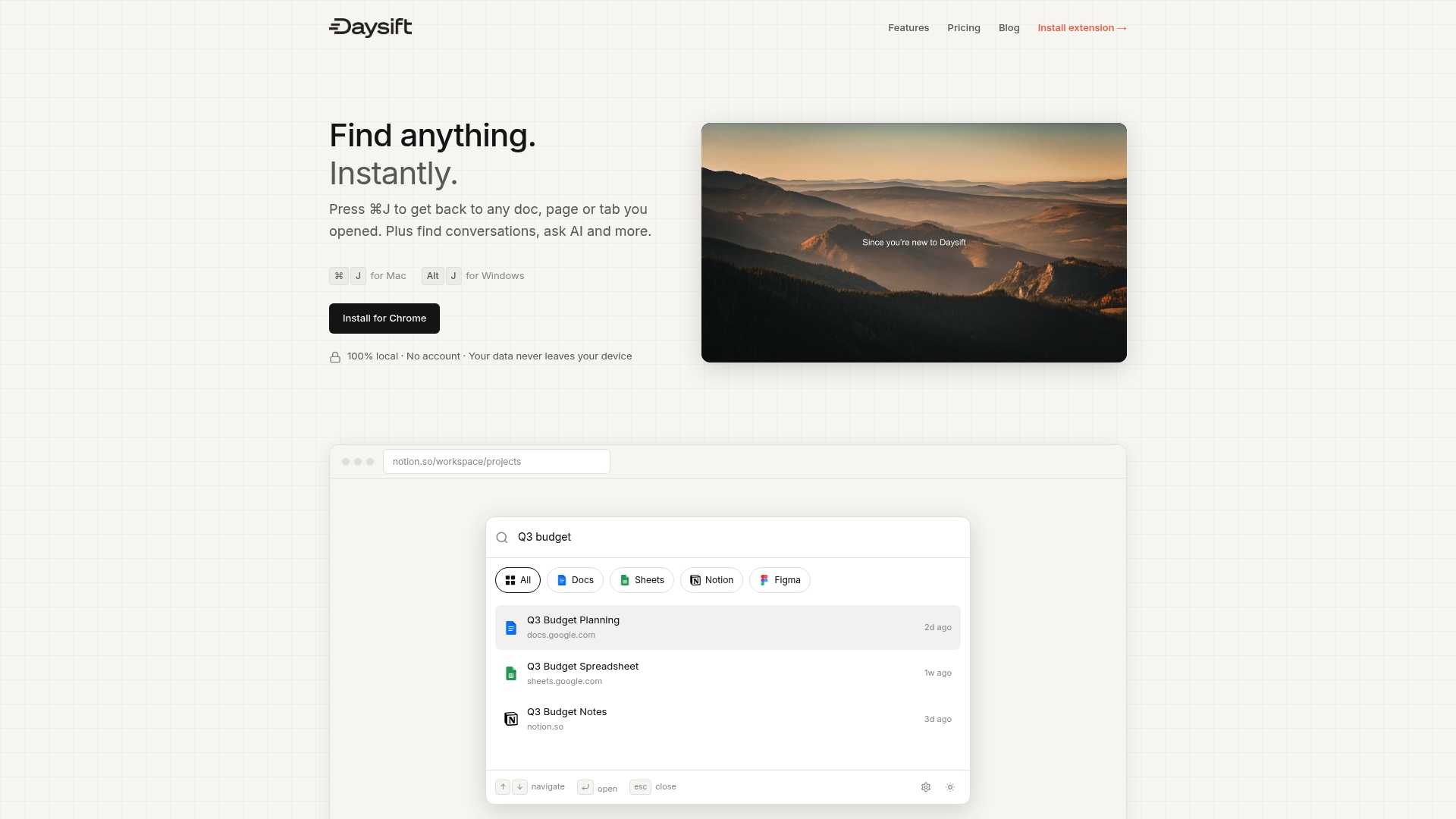
Daysift blends keyword and AI search in a single palette. Type a phrase for fast exact matching, or click “Ask AI” to search by meaning and intent. It skips social media and shopping sites automatically, so your results stay focused on actual work. Notes attach to URLs, pins give you one-keystroke access to your most-used pages, and everything stays local on your machine. No account, no cloud, no clutter. If you’re ready to stop drowning in tabs, get started with Daysift and see how fast finding things can actually be.
Frequently asked questions
Is AI search always better than keyword search?
No. AI search handles complex and conversational queries better, but keyword search wins for exact term lookups, compliance needs, and situations where precision is critical.
What are the risks of using only AI search?
AI search can produce hallucinations or miss precise details. Hybrid solutions perform better for critical work where accuracy is non-negotiable.
How does hybrid search help with productivity?
Hybrid search delivers both fast, precise answers and synthesized information, which means fewer open tabs and less time spent cross-referencing. Hybrid tools minimize tab overload while keeping results accurate.
Does optimizing content for AI search hurt SEO?
It can if you prioritize volume over quality. Using structured data and authoritative sources keeps both AI retrieval and traditional SEO working in your favor.
Can AI search save time in daily work?
Yes, especially when synthesizing information across multiple sources. AI search reduces navigation for knowledge workers by delivering synthesized answers instead of long lists of links to browse through.