
Most professionals have between 20 and 30 tabs open at any given moment, and a surprising number push past 50 without blinking. That’s not laziness or disorganization. That’s modern knowledge work. Every open tab represents a decision deferred, a resource saved, or a thread of thought you’re not ready to drop. The real cost shows up later, when you’re hunting through a wall of favicons trying to remember where you put that one article. This guide breaks down the best tools and strategies to fix tab overload for good, without requiring you to become a different kind of person.
Table of Contents
- Why tab overload happens (and why it’s not your fault)
- Top productivity tools for tab hoarders: features and workflow
- Comparison: which tab manager is right for you?
- Practical strategies for maintaining tab sanity long-term
- A different take: why fixing tab overload is about workflow, not willpower
- Ready to declutter? Supercharge your workflow with Daysift
- Frequently asked questions
Key Takeaways
| Point | Details |
|---|---|
| Tab hoarding is common | Most professionals struggle with open tabs due to fast-paced, info-rich workflows. |
| Top tools, real savings | Workona, OneTab, Karakeep, and Toby offer unique strategies that can cut memory use by up to 95%. |
| Choose based on workflow | Pick the tab manager that best matches your project style, automation needs, and budget. |
| Long-term tab sanity | Use habits, not just tools, to maintain a manageable workspace and boost your day-to-day productivity. |
Why tab overload happens (and why it’s not your fault)
Tabs are a cognitive tool. You open them to hold your place, track research, queue up reading, or keep a tool visible while you work. The problem is that browsers were never designed to help you manage what you accumulate. Chrome gives you a thin strip of icons with no context, no search, and no way to prioritize. So you end up with 40 tabs and a browser that’s starting to sound like a jet engine.
As tab hoarding explained on the Daysift blog, opening numerous tabs is a symptom of modern web workflows, not just poor discipline. The behavior is driven by a few very rational fears:
- Fear of losing information: Closing a tab feels permanent, even when you could find the page again.
- Context switching costs: Researchers estimate it takes over 20 minutes to fully regain focus after an interruption. Tabs are a way to avoid that cost.
- No better system: If your browser doesn’t offer search or organization, tabs become your filing cabinet by default.
- Multitasking demands: Agency workers, developers, and researchers routinely need 10 to 15 active resources at once.
“The browser tab is the modern sticky note. The problem isn’t that you use too many of them. It’s that they pile up with no way to sort or search them.”
Modern browsers actively encourage this behavior. Auto-restore on startup means tabs you meant to close yesterday are still there today. Tab groups exist but require manual effort. And there’s no built-in way to search across what you have open.
Pro Tip: Before you install any tool, spend five minutes identifying your actual pain point. Is it memory slowdown? Can’t find a specific tab? Too much visual clutter? The answer will point you to the right solution faster than any feature list.
Top productivity tools for tab hoarders: features and workflow
The good news is that a strong ecosystem of tools has grown up around this exact problem. Here’s how the leading options actually work in practice.
Workona is a workspace-based tab manager. It organizes your tabs into project-specific spaces, so your client research doesn’t bleed into your personal finance tabs. Workona reduces memory use by 40 to 60 percent through tab suspension, which means inactive tabs stop consuming RAM without disappearing. It’s best for people who work across multiple ongoing projects and need fast context switching.

OneTab takes a more aggressive approach. One click collapses every open tab into a single list. OneTab saves up to 95% of browser memory instantly. You can restore individual tabs or everything at once. It’s not pretty, but it’s fast and effective for people who need emergency relief from a bloated browser session.
Karakeep is the AI-forward option. It auto-tags and summarizes saved pages, applies rule-based organization, and scales to massive libraries. It’s built for researchers and heavy readers who want their saved content to be genuinely searchable and organized without manual effort.
Toby focuses on visual organization. You drag tabs into named collections, which are displayed as a visual board on your new tab page. Toby suits lightweight workflows and people who prefer seeing their resources at a glance rather than searching for them.
For anyone who wants to go deeper on choosing between these, the productivity tool guides on the Daysift blog cover real-world use cases in detail. And if your main frustration is finding tabs instantly, that’s a slightly different problem with its own best-fit solutions.
| Tool | Best for | Key feature | Price |
|---|---|---|---|
| Workona | Project-based work | Spaces and tab suspension | Free / paid plans |
| OneTab | Emergency memory relief | One-click tab collapse | Free |
| Karakeep | Research and reading | AI tagging and summaries | Paid |
| Toby | Visual organizers | Drag-and-drop collections | Free / paid plans |
Comparison: which tab manager is right for you?
Choosing the right tool comes down to three questions: How many tabs do you typically have open? Do you work across multiple projects? And how much time are you willing to spend organizing?
Memory savings vary significantly. Tab suspension cuts memory by 40 to 60 percent in Workona, which is meaningful but gradual. OneTab’s 95 percent reduction is dramatic and immediate, though it requires you to restore tabs manually when you need them back. If your laptop is struggling right now, OneTab wins on this metric.

Organization style is where preferences split. Workona and Toby both use visual, spatial organization. Workona is more structured (named spaces with search), while Toby is more freeform (drag tabs wherever they feel right). Karakeep skips the visual layer entirely and bets on AI to do the organizing for you. Karakeep scales to 50,000 bookmarks without breaking down, which makes it the clear choice for anyone building a long-term research library. Toby is better when you want simple drag-and-drop organization and don’t need that kind of scale.
AI and automation are Karakeep’s strongest selling point. It automatically tags pages, generates summaries, and applies rules you set. The other tools require more manual input, though Workona does offer search across open tabs.
Here’s a quick decision framework:
| Scenario | Recommended tool |
|---|---|
| Laptop is slow, need fast relief | OneTab |
| Multiple ongoing client projects | Workona |
| Heavy research, large bookmark library | Karakeep |
| Prefer visual boards, simple setup | Toby |
| Need to search across history, not just open tabs | Daysift |
Pro Tip: Don’t try to combine three tools at once. Pick the one that solves your biggest pain point, use it for two weeks, and only add another layer if a specific gap remains. Complexity is the enemy of consistency.
For more context on what drives the manage browser tabs problem in the first place, it helps to understand the workflow patterns behind it before committing to a solution.
Practical strategies for maintaining tab sanity long-term
Tools only work if your habits support them. Here are the strategies that actually stick.
-
Set up project-based workspaces from day one. Don’t wait until you’re overwhelmed. When you start a new project, open a new Workona space or Toby collection immediately. Workona’s project spaces allow instant switching and search, which means you can move between clients or tasks without losing your place or your sanity.
-
Schedule a weekly tab review. Set a 10-minute calendar block every Friday to go through saved tabs and collections. Archive anything you haven’t touched. Delete anything you know you won’t use. This prevents the slow creep of accumulation that defeats even the best organizational systems.
-
Use keyboard shortcuts instead of clicking through tabs. Every tool on this list has keyboard support. Learning two or three shortcuts cuts the time you spend navigating tabs by more than half. If you want to go further, tools built for save and search tabs let you pull up any resource in under three seconds without touching the mouse.
-
Turn on automatic tab suspension. Workona does this natively. For other browsers, a lightweight suspension extension can handle it. Suspended tabs stay in your list but stop consuming memory until you click on them.
-
Capture notes before you close a tab. The reason most people keep tabs open is fear of losing the insight, not the page itself. A quick note attached to the URL solves this. You can close the tab and still find the thought later.
The underlying principle here is that tab sanity is a system, not a one-time cleanup. The tools help, but the habits are what keep the system running three months from now.
A different take: why fixing tab overload is about workflow, not willpower
There’s a persistent idea that people with too many tabs just need more discipline. Close what you’re not using. Be more intentional. Stop hoarding. This framing puts the blame on the individual and ignores the structural reality: most professionals juggle dozens of tabs by necessity, not by choice. The work demands it.
The real issue is that browsers were designed for casual browsing, not for the kind of deep, multi-threaded knowledge work that most professionals do every day. Expecting willpower to compensate for a tool that wasn’t built for your workflow is like blaming yourself for being slow in a car with no GPS.
The highest-ROI move isn’t forcing yourself to close tabs. It’s redesigning the system around how you actually work. That means picking tools that match your workflow style, building lightweight habits that don’t require constant effort, and treating your browser setup as infrastructure worth investing in. Understanding the real tab overload causes reframes the whole problem. Once you see it as a design issue rather than a character flaw, the solutions become obvious and the guilt goes away.
Ready to declutter? Supercharge your workflow with Daysift
If the tools above help you organize tabs, Daysift takes the next step: it makes everything you’ve ever had open instantly searchable, without requiring you to organize anything at all. Press ⌘J (Mac) or Alt+J (Windows), type a few words you remember, and the page surfaces immediately. No folders. No collections. No maintenance.
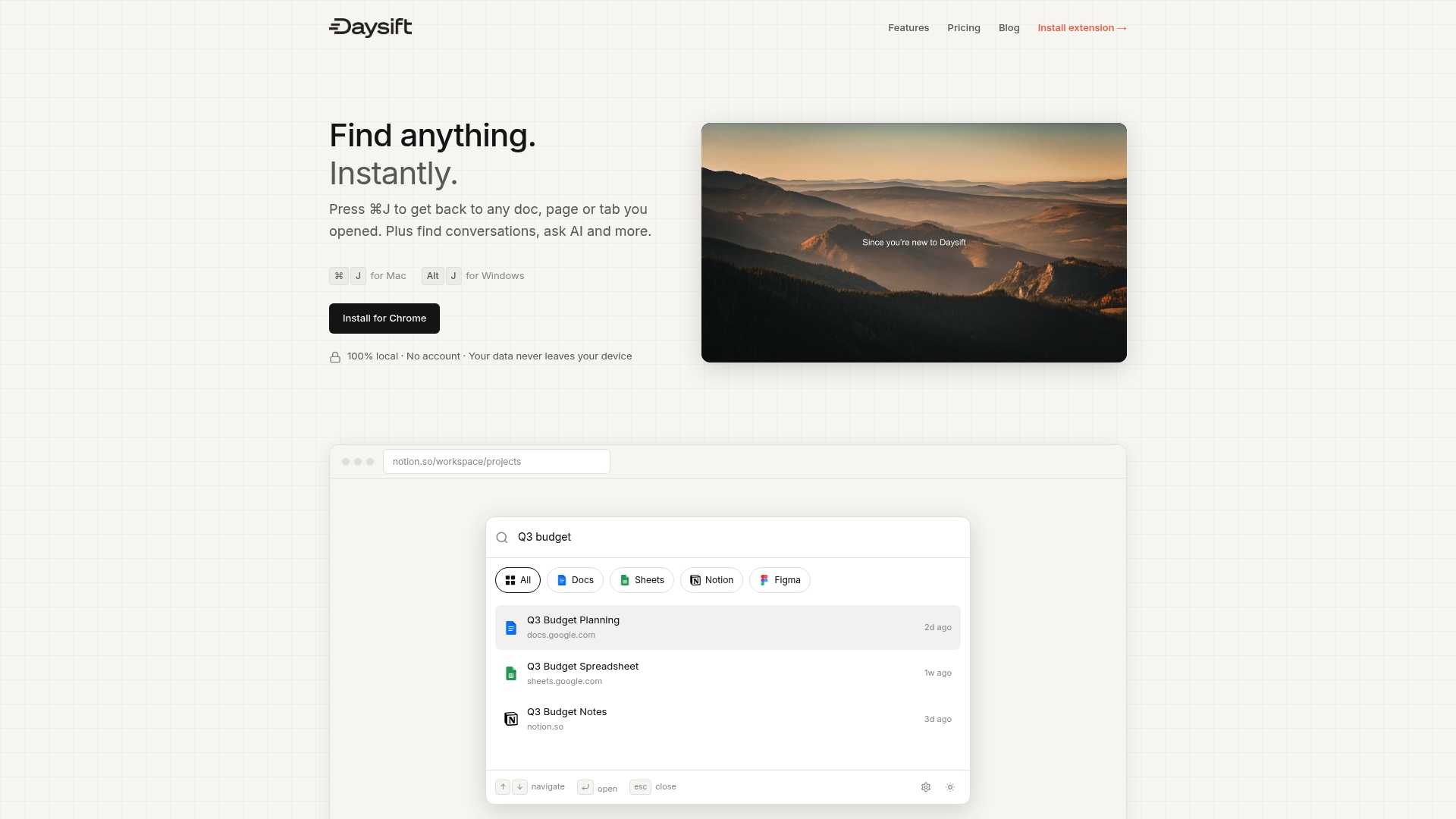
Daysift indexes every work-relevant page you visit locally on your machine, skips social media and shopping noise automatically, and lets you search by meaning rather than exact keywords. It’s the layer that sits beneath every other tool and makes your entire browsing history findable in seconds. Get started with Daysift and stop spending time hunting for things you’ve already found once.
Frequently asked questions
What is the fastest way to reduce memory use from too many tabs?
OneTab collapses all tabs into a single list, freeing up to 95 percent of browser memory instantly. It’s the quickest single-click fix available.
Which tab manager is best for organizing by project or context?
Workona’s Spaces feature lets you group tabs by project and switch between them instantly, making it the strongest option for project-based work.
Are there AI-powered tools that auto-tag or summarize tabs?
Karakeep uses AI to automatically tag, summarize, and apply rule-based organization to every page you save, with no manual effort required.
How can I quickly find a specific tab among dozens?
Workona and Daysift both offer powerful search across open and saved tabs, so you can locate any resource in seconds without scrolling through a wall of icons.