
TL;DR:
- Retrieval-Augmented Generation (RAG) allows real-time access to up-to-date information by combining semantic search with AI.
- Building a RAG pipeline involves document ingestion, vector storage, hybrid search, and context augmentation for accurate responses.
- Tools like Daysift enable instant search across browsing history without setup, reducing tab chaos and increasing productivity.
You open Chrome, and there are 47 tabs staring back at you. Somewhere in that mess is the proposal you were editing, the research article you bookmarked, and the API documentation you need right now. Sound familiar? Instant document retrieval refers to Retrieval-Augmented Generation (RAG), a technique that enables real-time access to up-to-date information by combining semantic search with AI generation. For knowledge workers and freelancers, this isn’t just a technical upgrade. It’s the difference between spending 15 seconds hunting for a document and finding it in under 3.
Table of Contents
- Requirements and tools for instant document retrieval
- Step-by-step: Setting up your instant retrieval workflow
- Troubleshooting and optimizing retrieval accuracy
- Verifying results and evolving your retrieval strategy
- A smarter way to end tab chaos: Our take
- Upgrade your workflow with Daysift
- Frequently asked questions
Key Takeaways
| Point | Details |
|---|---|
| RAG powers instant retrieval | Retrieval-Augmented Generation helps you quickly access precise documents using AI-driven semantic search. |
| Quality tools matter | Using the right embedding models and vector databases ensures high retrieval accuracy and speed. |
| Optimize for accuracy | Refining chunk size, retrieval strategies, and reranking can boost reliability and minimize errors. |
| Dynamically evolve systems | Adopt agentic, modular retrieval processes to improve search relevance over time. |
Requirements and tools for instant document retrieval
Before you build anything, you need to understand what a retrieval system actually does under the hood. The core mechanic is a RAG pipeline, which moves through three stages: ingestion, retrieval, and generation. Document ingestion involves chunking your content into smaller pieces, converting those chunks into numerical vectors via an embedding model, and storing them in a vector database. When you search, the system converts your query into a vector and finds the closest matches.
Here are the key components you’ll need:
- Embedding model: Converts text into vectors. BGE-M3 is a strong open-source option that handles multilingual content well.
- Vector database: Stores and retrieves embeddings at speed. Pinecone works well for cloud-hosted setups; FAISS is a solid local option.
- Hybrid search layer: Combines dense vector search with traditional keyword (BM25) search for better precision and recall.
- Orchestration framework: LangChain or LlamaIndex connects your components into a working pipeline.
| Tool | Type | Best for |
|---|---|---|
| BGE-M3 | Embedding model | Multilingual, high accuracy |
| Pinecone | Vector DB | Scalable cloud retrieval |
| FAISS | Vector DB | Local, low-latency retrieval |
| BM25 | Keyword search | Exact term matching |
| LangChain | Orchestration | Connecting pipeline components |
For teams building production-grade systems, working with AI software delivery specialists can accelerate setup and reduce costly missteps.
Pro Tip: Chunk size is one of the most overlooked decisions in a retrieval setup. Chunks that are too small lose context; chunks that are too large introduce noise. Start with 512 tokens and adjust based on your retrieval quality metrics before scaling.
Step-by-step: Setting up your instant retrieval workflow
With your tools selected, here’s how to structure the actual pipeline from raw documents to searchable results.
- Ingest your documents. Load files (PDFs, Markdown, HTML) using a document loader. Split them into chunks using a text splitter, typically with a 10-20% overlap between chunks to preserve context across boundaries.
- Generate embeddings. Pass each chunk through your embedding model to produce a vector representation. Store the vector alongside the original text and any relevant metadata (source URL, date, author).
- Store in a vector database. Index your embeddings in Pinecone or FAISS. Add metadata filters so you can narrow searches by domain, date range, or document type later.
- Query with hybrid retrieval. When a user searches, run both a dense vector search and a BM25 keyword search in parallel. Merge the results using a reranker model to surface the most relevant chunks.
- Augment and generate. Pass the top retrieved chunks as context into your language model prompt. The model generates a response grounded in your actual documents, not just its training data.
The RAG pipeline covers ingestion, retrieval, augmentation, and generation as four distinct stages, and treating them separately makes debugging far easier.
| Pipeline stage | Core action | Optional enhancement |
|---|---|---|
| Ingestion | Chunk + embed documents | Metadata tagging, deduplication |
| Retrieval | Vector + keyword search | Reranking, MMR diversity |
| Augmentation | Inject context into prompt | Query rewriting, chain-of-thought |
| Generation | LLM produces answer | Streaming output, citations |
For teams that need this to scale reliably, scalable software development practices like modular architecture and automated testing make a real difference at the retrieval layer.

Pro Tip: Prompt engineering matters more than most people expect. Instead of asking your LLM to “answer based on context,” instruct it to cite the specific chunk it used. This forces grounded responses and makes hallucinations easier to spot and fix.
Troubleshooting and optimizing retrieval accuracy
Setting up your workflow is only the beginning. The most common failure modes in retrieval systems are subtle and only surface once you’re working with real data at scale.
Here are the issues you’ll encounter most often:
- Context loss from chunking: Splitting a document at the wrong boundary can cut a sentence in half, destroying the meaning. Use sentence-aware splitters and overlap to mitigate this.
- Hallucinations: Even with RAG, language models can generate plausible-sounding but incorrect answers when retrieved context is ambiguous or sparse.
- Embedding drift: If you update your embedding model, older vectors become incompatible. Re-index your entire corpus when switching models.
- Temporal blindness: Vector search has no concept of recency unless you explicitly filter by date metadata.
“The right chunk size balances context and noise. Reranking boosts accuracy by 15 to 25 percent, making it one of the highest-leverage optimizations in any RAG pipeline.”
RAG systems do deliver meaningful improvements. 70% hallucination reduction is achievable compared to vanilla language models, but production failures still happen from noise, embedding drift, and edge cases that your test set never covered. The Atlantic’s engineering team documented exactly this: even well-built RAG systems fail when documents are ambiguous, outdated, or poorly structured.
The fix isn’t a single silver bullet. It’s layering defenses: add a reranker to improve result ordering, use metadata filters to eliminate irrelevant sources, and build an AI integrated software evaluation loop that flags low-confidence retrievals for human review.
Verifying results and evolving your retrieval strategy
Having addressed common challenges, it’s essential to verify and refine your process for ongoing productivity gains. A retrieval system that worked well at launch will degrade quietly over time if you don’t actively monitor it.
Here’s what a solid verification and evolution practice looks like:
- Benchmark with ground truth sets. Create a test set of 50 to 100 queries where you know the correct document. Measure recall@5 (did the right document appear in the top 5 results?) and mean reciprocal rank.
- Monitor for retrieval drift. Track query latency, result relevance scores, and user behavior (did they click the top result or keep scrolling?) over time.
- Audit your index regularly. Remove stale documents, re-embed updated content, and check for duplicate chunks that inflate result noise.
- Adopt multi-hop retrieval. For complex queries that span multiple documents, standard single-pass retrieval misses connections. Multi-hop strategies retrieve iteratively, following relationships between chunks.
94% document retrieval accuracy is achievable with custom-tuned systems, according to research on advanced RAG configurations. Agentic and Graph RAG approaches unlock nuanced relationships between documents and enable dynamic, goal-directed retrieval strategies that static pipelines simply can’t match.
Graph RAG is particularly powerful for knowledge workers who deal with interconnected topics. Instead of treating documents as isolated chunks, it maps relationships between entities, letting you ask questions like “what did this client say about pricing across all our project notes?” and get a coherent answer drawn from multiple sources.

The key mindset shift is treating your retrieval system as a living product, not a one-time build. The documents you work with change, your query patterns evolve, and the tools available improve rapidly. Build in a monthly review cycle and your system will compound in value over time.
A smarter way to end tab chaos: Our take
Here’s the uncomfortable truth most productivity advice skips: tab management tools don’t actually solve the problem. They just move the chaos from your browser to another interface you have to maintain. Folders, workspaces, color-coded groups. You’re still organizing. You’re still searching manually. You’ve just added a layer of friction.
The real solution is a search layer that works on what you’ve already opened, without requiring you to organize anything. Spaces and panels reduce search time from 15 seconds to 3 seconds, and agentic RAG avoids the brittleness of static pipelines by adapting to context dynamically. That’s the architecture that actually holds up in production.
What we’ve seen consistently is that the freelancers and knowledge workers who gain the most from retrieval tools are the ones who stop trying to maintain a perfect system and start trusting search. Type what you remember, not what you filed it under. The best retrieval tools meet you where your memory actually is, fuzzy and partial and human. Build toward that, and you’ll stop losing time to tab chaos for good.
Upgrade your workflow with Daysift
If the RAG pipeline feels like too much to build from scratch, there’s a faster path to instant retrieval right inside your browser. Daysift is a Chrome extension that quietly indexes every work-relevant page you visit and makes it all searchable with one keyboard shortcut.
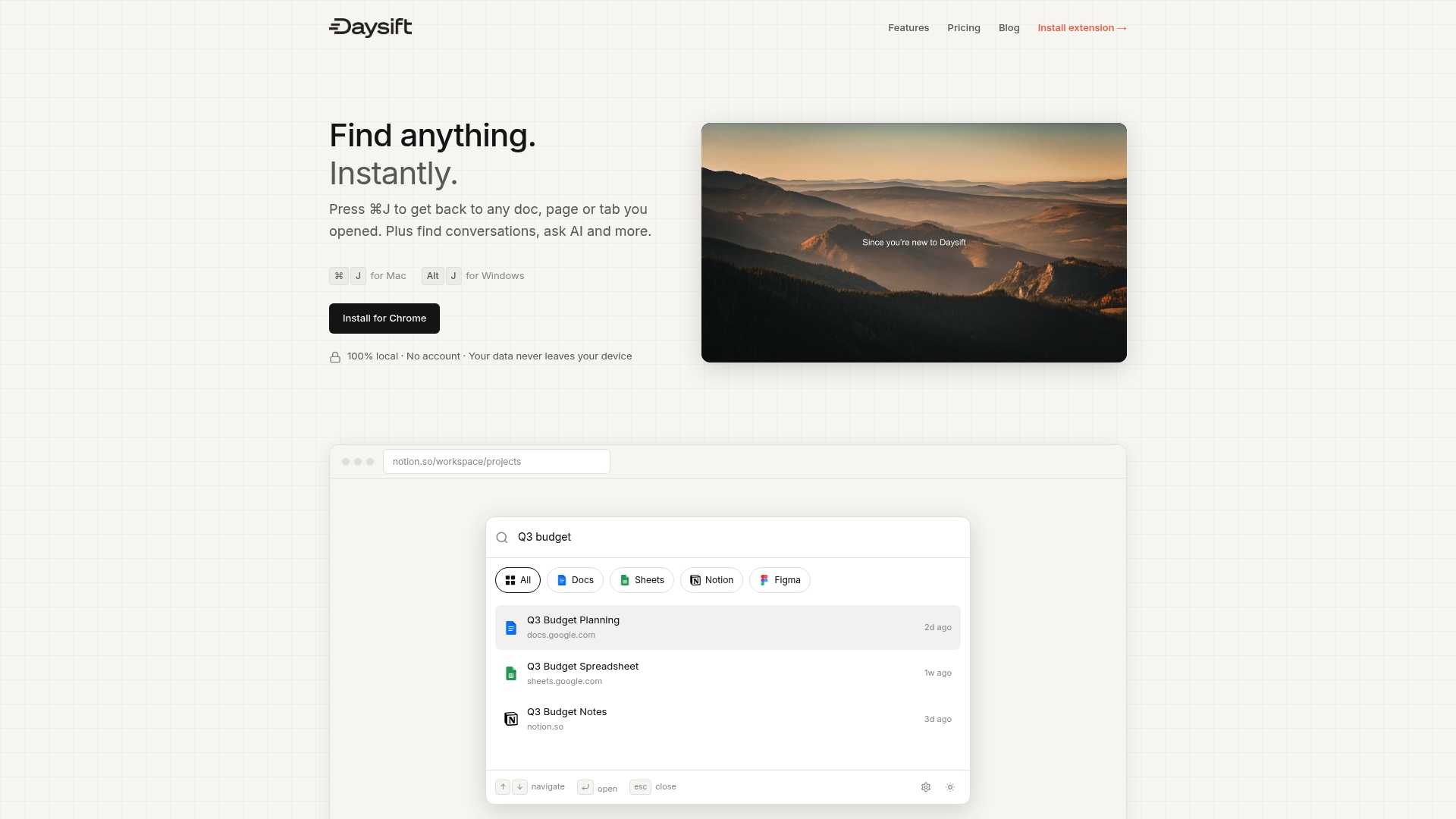
No setup, no vector databases, no prompt engineering required. Press ⌘J (Mac) or Alt+J (Windows), type a few words you remember about the page, and you’re there in seconds. You can find anything instantly across your entire browsing history, filter by domain, ask AI questions about page content, and capture notes without switching tabs. It’s the retrieval layer your browser should have had all along. Ready to stop hunting through tabs? Get started with Daysift and reclaim your focus today.
Frequently asked questions
What is the instant document retrieval process and how does it work?
It’s a workflow where relevant documents are quickly found using semantic search and RAG, then summarized or referenced by an AI system. RAG enables instant access to up-to-date information by grounding AI responses in your actual documents rather than static training data.
How accurate is instant retrieval compared to traditional search?
Modern RAG systems can reach up to 94% retrieval accuracy with custom tuning, significantly outperforming traditional keyword search that depends on exact term matching.
What are common pitfalls of deploying instant retrieval systems?
Chunking can destroy context at document boundaries, hallucinations arise when retrieved context is sparse, and embedding drift and production noise can quietly degrade reliability over time.
How can freelancers benefit from instant retrieval?
Freelancers can cut document search time dramatically, with search time dropping from 15 seconds to as little as 3 seconds per lookup, freeing up focus for actual work.