
Managing browser tabs has become one of the biggest productivity challenges for knowledge workers in 2026. Average users keep 35 to 50 tabs open simultaneously, leading to a 27% decrease in work efficiency due to cognitive overload. This article evaluates the most effective tab management strategies available in 2026 using clear criteria, comparing AI-driven browsers, lightweight extensions, and workflow redesigns. You’ll discover which approach fits your work style and how to reclaim lost productivity from tab chaos.
Table of Contents
- How To Evaluate Tab Management Strategies: Key Criteria For 2026
- Innovative Tools And Techniques To Streamline Browser Tabs In 2026
- Comparing Top Tab Management Options: Performance, Cognitive Load, And Usability
- Choosing The Right Tab Management Strategy For Your Workflow In 2026
- Discover Smarter Ways To Find And Manage Browser Tabs With Daysift
- Frequently Asked Questions About Tab Management Strategies For 2026
Key takeaways
| Point | Details |
|---|---|
| Tab overload costs time | Keeping 35 to 50 tabs open reduces efficiency by 27% through cognitive overload and constant context switching. |
| Multiple strategies exist | AI browsers, extensions like Supertab, and Zero-Tab Workflow each offer distinct benefits for different work styles. |
| Evaluation criteria matter | Choose strategies based on efficiency gains, cognitive load reduction, resource usage, and ease of implementation. |
| Measurable improvements | Top tools reduce tab switching time by up to 40% and cut cognitive load by 36% in real-world workflows. |
| Decision framework helps | Match your typical tab count, multitasking needs, and technical comfort to the right strategy for lasting results. |
How to evaluate tab management strategies: key criteria for 2026
Choosing the right tab management approach requires understanding what separates effective solutions from gimmicks. The best strategies deliver measurable improvements across several key dimensions that directly impact your daily work.
Efficiency stands as the primary criterion. You need solutions that reduce the time spent switching between tabs and completing tasks. Switching between browser tabs, even for 2 to 3 seconds, leaves residual cognitive load that impairs working memory recall for up to 22 seconds. This hidden cost compounds throughout your workday, making speed improvements critical.
Cognitive load reduction matters just as much as raw speed. Your brain can only juggle so many open loops before performance degrades. Effective tab strategies minimize the mental effort required to locate information, remember what’s where, and maintain focus on your current task. Lower cognitive overhead translates directly to better decision making and fewer errors.
Resource usage affects everyone differently depending on hardware. Some tab management tools add memory overhead or CPU cycles that slow older machines. Others operate with minimal footprint. Consider how many tabs you typically manage and whether your computer struggles with current loads before adding another layer of software.
User control over notifications and interruptions has become essential in 2026. The best strategies let you decide when and how tabs demand attention. Constant notification badges and auto-refreshing content create artificial urgency that fragments focus. Look for solutions that put you in charge of information flow.
Consistency in tab layout reduces decision fatigue throughout your day. When tabs appear in predictable locations or follow logical grouping rules, you spend less mental energy remembering where things are. This frees cognitive resources for actual work rather than navigation overhead.
Compatibility with modern operating systems like Windows 11 and macOS Sonoma ensures smooth integration. Native features like virtual desktops, window snapping, and system-level shortcuts should complement your tab strategy rather than conflict with it. Check whether tools support your specific browser version and OS combination.
Pro Tip: Test any new tab management strategy for at least one full work week before judging its effectiveness. Initial friction from changing habits often masks genuine long-term benefits.
Understanding zero-tab workflows and cognitive science benefits provides deeper context for why these criteria matter. The zero-tab workflow benefits extend beyond simple organization to fundamental improvements in how your brain processes information during work sessions.
Innovative tools and techniques to streamline browser tabs in 2026
Several breakthrough approaches have emerged to tackle tab overload, each taking a different angle on the core problem. Understanding their unique features helps you identify which solution aligns with your workflow.

Google Disco represents the AI-driven approach to tab management. This experimental browser generates custom web applications from your open tabs, transforming complex multi-tab workflows into single interactive interfaces. Instead of juggling tabs for research, project management, or data analysis, Disco creates a unified workspace that pulls relevant information together. The AI learns your patterns and suggests app configurations based on your browsing behavior.
The main advantage lies in simplification. Complex workflows that once required 15 to 20 tabs can collapse into a single organized view. This dramatically reduces context switching and makes it easier to see relationships between information sources. However, Disco requires trusting AI to interpret your needs correctly and works best for repetitive workflow patterns rather than exploratory browsing.
Supertab takes a minimalist extension approach focused purely on speed. It reduces average tab-switching latency from 1.82 to 1.09 seconds and cuts cognitive load by 36% through intelligent search and keyboard shortcuts. Rather than replacing your browser’s native tab system, Supertab enhances it with fuzzy search, recent tab history, and customizable hotkeys.
Supertab shines for users who prefer keeping their existing workflow while eliminating friction points. The memory footprint stays under 50MB even with hundreds of tabs indexed. Installation takes seconds and requires no configuration for basic use. The downside is that Supertab doesn’t organize tabs or reduce their total number, it just makes finding them faster.
Zero-Tab Workflow represents a philosophical shift rather than a specific tool. This approach minimizes context switching by eliminating the need to hunt through tabs entirely. Practitioners close tabs immediately after use, relying instead on bookmarks, reading lists, and dedicated note-taking systems to capture important information.
The benefits include complete elimination of tab-related cognitive load and maximum system resources available for active work. Your browser becomes a clean slate for whatever task demands attention right now. The challenge lies in building robust capture systems and trusting that you can retrieve information later when needed.
Pro Tip: Combine approaches strategically. Use Zero-Tab Workflow as your default philosophy, Supertab for the 5 to 10 tabs you need during active work sessions, and bookmark managers for long-term reference material.
Integrating these tools with your daily routine requires intentional practice. Start by identifying your most common tab management pain points. Do you lose tabs you need later? Spend too long finding the right one? Feel overwhelmed by visual clutter? Match the pain point to the solution that directly addresses it.
Mastering tab search techniques complements any strategy you choose, providing a safety net when organization systems inevitably break down during high-pressure work periods.
Comparing top tab management options: performance, cognitive load, and usability
Direct comparison across key metrics reveals which strategies deliver the most value for different user profiles and work scenarios.
| Strategy | Task Time Reduction | Cognitive Load Impact | Memory Footprint | Learning Curve | Best For |
|---|---|---|---|---|---|
| Google Disco | 25 to 30% | High reduction for repetitive workflows | 200 to 300MB | Moderate | Research-heavy roles with pattern workflows |
| Supertab | 28% median | 36% reduction | Under 50MB | Minimal | Power users comfortable with keyboard shortcuts |
| Zero-Tab Workflow | 35 to 40% | Maximum reduction | Zero overhead | Steep initially | Minimalists willing to rebuild habits |
| Native tab groups | 10 to 15% | Moderate reduction | Negligible | Easy | Casual users wanting simple organization |
Disabling native tab cycling and replacing it with Supertab reduced median task-completion time by 28% in controlled studies. This represents the largest single-tool improvement available without changing fundamental workflows.
Google Disco excels when your work follows predictable patterns. If you regularly perform the same type of research, manage similar projects, or analyze comparable data sets, the AI-generated interfaces save substantial time. The learning curve involves teaching the system your preferences and trusting its suggestions.
Zero-Tab Workflow delivers the highest theoretical gains but demands the most behavioral change. You must develop reliable systems for capturing information, build trust in your retrieval methods, and resist the urge to keep tabs open just in case. The payoff comes in completely eliminating tab-related mental overhead.
Native browser tab groups offer the easiest entry point for users new to tab management. Chrome, Edge, and Firefox all include built-in grouping with color coding and labels. While improvements remain modest compared to dedicated tools, the zero learning curve and instant availability make groups worth trying first.
Memory considerations matter most for users running multiple applications simultaneously or working on older hardware. Zero-Tab Workflow wins by definition since closed tabs consume no resources. Supertab adds minimal overhead. Google Disco requires significant memory but less than keeping dozens of individual tabs active.
Cognitive load measurements show the clearest differentiation. Strategies that reduce visual clutter and eliminate hunting behavior provide the largest mental relief. Zero-Tab Workflow and Supertab both score high here, while Disco’s effectiveness depends on how well the AI matches your mental model.
Pro Tip: Track your own metrics for two weeks with each strategy. Count daily tab switches, note moments of frustration, and measure time spent looking for information. Personal data beats generic benchmarks.
Leveraging keyboard shortcuts for efficiency amplifies benefits from any tab management strategy, creating compound productivity gains that extend beyond browser navigation alone.
Choosing the right tab management strategy for your workflow in 2026
Selecting your optimal approach requires honest assessment of your current habits, technical comfort level, and willingness to change established patterns.
-
Count your typical tab load across a normal work week. Under 10 tabs suggests native grouping suffices. Between 10 and 30 tabs indicates Supertab or similar extensions provide the best value. Above 30 tabs means you need either AI assistance like Disco or a fundamental workflow change toward Zero-Tab methods.
-
Evaluate your context switching tolerance. Some people thrive with multiple parallel streams of work. Others need singular focus to perform well. High multitaskers benefit from tools that organize many tabs efficiently. Low multitaskers should minimize tabs entirely to reduce temptation and distraction.
-
Assess your notification management preferences. If you want tabs to alert you about updates, choose strategies that preserve this functionality. If notifications fragment your focus, prioritize approaches that eliminate or strictly control interruptions. Consistent layouts reduce decision fatigue, and controlling notifications improves focus regardless of which core strategy you adopt.
-
Consider your technical comfort with new tools. Browser extensions require minimal setup but add another system to maintain. AI browsers demand more trust in automated decisions. Workflow redesigns need no new software but require discipline and habit formation. Match the implementation complexity to your patience for learning curves.
-
Test strategies incrementally rather than completely overhauling your system overnight. Try one approach for two weeks while keeping your old method available as backup. Measure specific outcomes like time saved, frustration reduced, or tasks completed more smoothly. Iterate based on real results rather than theoretical benefits.
Pro Tip: Schedule a monthly review of your tab management system. Workflows evolve, new tools emerge, and what worked in January may need adjustment by June. Regular optimization prevents gradual drift back into chaos.
Maintaining good tab habits prevents overload regardless of which tools you choose. Close tabs immediately when you finish with them rather than letting them accumulate. Use bookmarks or reading lists for content you want later. Dedicate specific times to tab cleanup rather than letting disorder build throughout the day.
The best strategy combines multiple approaches tailored to your unique situation. You might use Zero-Tab Workflow as your philosophy, Supertab for active work sessions, and bookmark folders for long-term reference. Experiment until you find the combination that feels effortless rather than forced.
Discover smarter ways to find and manage browser tabs with Daysift
Even with the best tab management strategy, you still need fast access to information scattered across your browsing history. Daysift solves the retrieval problem that tab managers don’t address.
Press one keyboard shortcut and search everything you’ve ever opened in Chrome. That article you read last week, the documentation you referenced yesterday, the tool you tried last month but forgot the name of. Type a few words and Daysift finds it instantly through fuzzy matching and AI-powered semantic search.
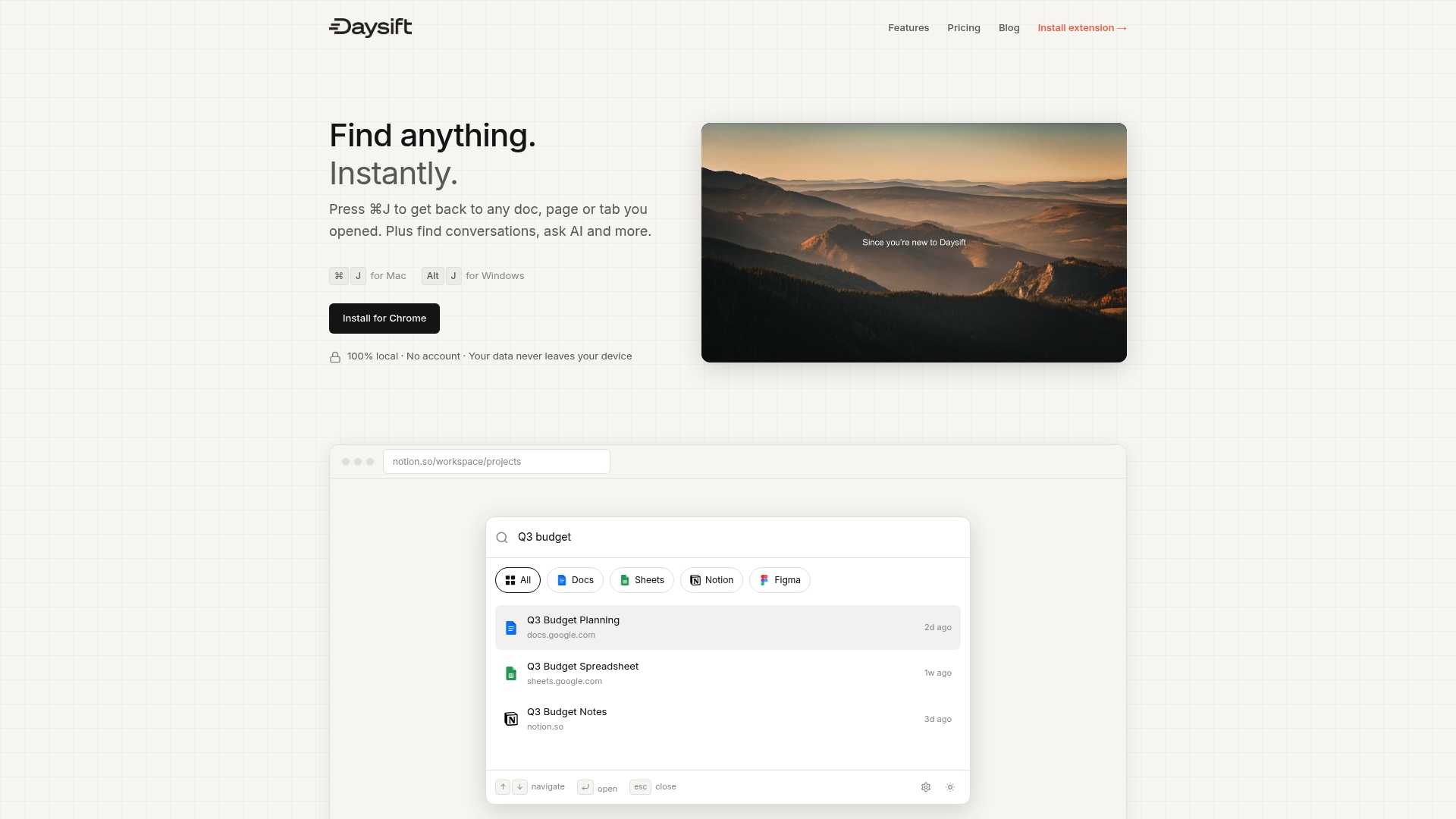
Unlike tab managers that store tabs somewhere fragile, Daysift indexes your actual browsing as it happens. Nothing to organize, nothing to lose when extensions update or crash. Your data stays local on your machine with zero cloud sync required.
Whether you adopt Zero-Tab Workflow, use Supertab, or stick with native tab groups, Daysift complements any strategy by ensuring you can always find what you need. Start using Daysift today and stop hunting through tabs forever.
Frequently asked questions about tab management strategies for 2026
What is the cognitive impact of having many open tabs?
Keeping 35 to 50 tabs open simultaneously creates cognitive overload that reduces work efficiency by 27%. Each tab switch impairs working memory for up to 22 seconds, compounding throughout your day. This mental tax slows decision making and increases errors even when you’re not actively switching tabs.
How can I reduce tab switching time effectively?
Tools like Supertab cut average switching time from 1.82 to 1.09 seconds through keyboard shortcuts and intelligent search. This 40% reduction saves hours weekly for heavy browser users. Combining fast search with fewer total tabs through Zero-Tab Workflow delivers even larger gains.
What are the benefits of AI-assisted browsing for tab management?
AI browsers like Google Disco transform multiple tabs into unified interfaces, reducing context switching by 25 to 30% for repetitive workflows. The AI learns your patterns and suggests optimal layouts. This works best when your work follows predictable patterns rather than constant exploration.
Is Zero-Tab Workflow practical for remote professionals?
Yes, but it requires building reliable capture systems for information you’ll need later. Remote workers who adopt Zero-Tab Workflow report 35 to 40% task time reductions once habits form. The key is trusting bookmarks, notes, and search tools to retrieve information instead of keeping tabs open as reminders.
How do I maintain good tab habits to prevent overload?
Close tabs immediately after use rather than letting them accumulate. Schedule daily cleanup sessions to review and organize remaining tabs. Use browser bookmarks or reading lists for content you want later. Set a personal maximum like 10 active tabs and stick to it through consistent practice.
Can I combine different tab management strategies?
Absolutely. The most effective approach often mixes Zero-Tab philosophy with tools like Supertab for active work sessions. Use AI browsers for repetitive workflows, extensions for speed, and workflow discipline to prevent accumulation. Experiment to find your optimal combination based on real productivity metrics.